PhD Tools: Turn Off the Internet with Freedom
All parts
- PhD Tools: Beeminder Aug 2016
- PhD Tools: Visualise Structure and Kanban Flow with Trello Aug 2016
- PhD Tools: Think better with Tinderbox Aug 2016
- PhD Tools: DevonThink for File Storage and Discovery Aug 2016
- PhD Tools: Save your web links with Pinboard Aug 2016
- PhD Tools: Scrivener for Writing Long Things Aug 2016
- PhD Tools: Bookends for Managing References Aug 2016
- PhD Tools: Mellel for Layout and Final Presentation Sep 2016
- PhD Tools: RescueTime for Time Tracking Sep 2016
- PhD Tools: Turn Off the Internet with Freedom Sep 2016
- PhD Tools: Backup Systems for Staving off Sadness Sep 2016
- PhD Tools: Omnifocus for Managing your Non-PhD Life Sep 2016
- PhD Tools: The Secret to Finishing Your PhD Sep 2016
- PhD Tools: Vitamin-R and the Pomodoro Technique for Getting Going Sep 2016
- PhD Tools: Freewriting and Journalling to Think Through your Work Sep 2016
- PhD Tools: Pen and Paper Sep 2016
- PhD Tools: 'Always return to your primary sources' Sep 2016
- PhD Tools: Goodreads for Cross-Pollination Sep 2016
- PhD Tools: Sleep and Movement to Nourish the Body Sep 2016
- PhD Tools: Tea Sep 2016
[This is part of a series on the tools I used to write my PhD. Check out the other parts here.]
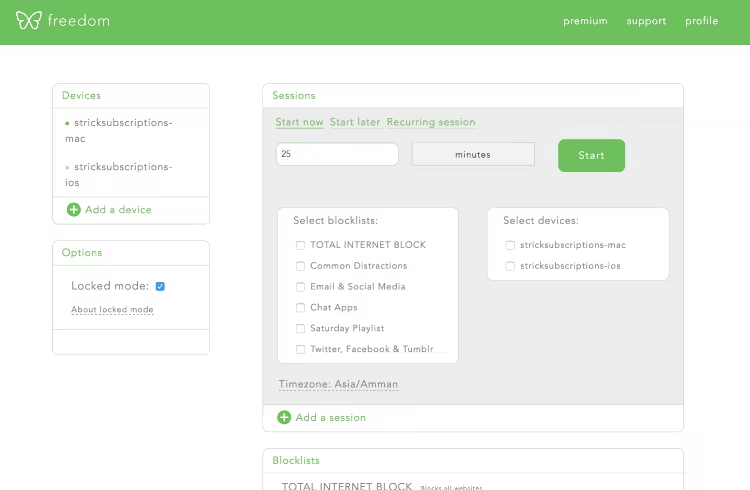
Freedom does one thing and it does it well: turning off the internet (or parts of it). It removes temptation by giving you a time slot where the internet is turned off (and no way to turn it back on) on both your laptop and your phone. [Note: at the current moment there is no Android version of Freedom, but it’s been a long time coming so I imagine that will be released in the near-term future – a recent twitter query suggested “end of the summer”].
You can run it on an ad hoc basis – i.e. you decide that you want 30 minutes of ‘freedom’ starting now, click, and then you’ve turned off the internet. OR you can pre-schedule those times (my preference) such that you can say Every Monday-Friday, I want to turn the internet off from 5am-12 noon every day. That time will thus be core time for writing, reading or using in some other kind of productive manner, free from distractions and interruptions.
You can tweak the settings so that you’re not turning off the entire internet. You can make your own custom blacklist of sites that you know are kryptonite for you. (RescueTime is a great way of coming up with that list of which sites you’re sinking too many hours into, especially when you have a few months of data). I don’t particularly like this selective blocking because there’s always going to be a new site of some kind or other that I haven’t preemptively added to my blacklist. I don’t need any access to the internet for my work, actually, so it’s easiest to just turn it off completely.
In short, Freedom is great for aligning your goals (i.e. write words for my PhD every day) with a reality in which there are many shiny sites and videos and social media streams to follow. If you can find a way to turn that all off (or down to as minimal a level as possible) you’ll get a lot more done and feel better at the same time.
Get new posts by email
Every new post, technical and personal, sent when I publish. Unsubscribe any time. Prefer a feed reader? There's technical RSS and personal RSS.