PhD Tools: Visualise Structure and Kanban Flow with Trello
All parts
- PhD Tools: Beeminder Aug 2016
- PhD Tools: Visualise Structure and Kanban Flow with Trello Aug 2016
- PhD Tools: Think better with Tinderbox Aug 2016
- PhD Tools: DevonThink for File Storage and Discovery Aug 2016
- PhD Tools: Save your web links with Pinboard Aug 2016
- PhD Tools: Scrivener for Writing Long Things Aug 2016
- PhD Tools: Bookends for Managing References Aug 2016
- PhD Tools: Mellel for Layout and Final Presentation Sep 2016
- PhD Tools: RescueTime for Time Tracking Sep 2016
- PhD Tools: Turn Off the Internet with Freedom Sep 2016
- PhD Tools: Backup Systems for Staving off Sadness Sep 2016
- PhD Tools: Omnifocus for Managing your Non-PhD Life Sep 2016
- PhD Tools: The Secret to Finishing Your PhD Sep 2016
- PhD Tools: Vitamin-R and the Pomodoro Technique for Getting Going Sep 2016
- PhD Tools: Freewriting and Journalling to Think Through your Work Sep 2016
- PhD Tools: Pen and Paper Sep 2016
- PhD Tools: 'Always return to your primary sources' Sep 2016
- PhD Tools: Goodreads for Cross-Pollination Sep 2016
- PhD Tools: Sleep and Movement to Nourish the Body Sep 2016
- PhD Tools: Tea Sep 2016
[This is part of a series on the tools I used to write my PhD. Check out the other parts here.]
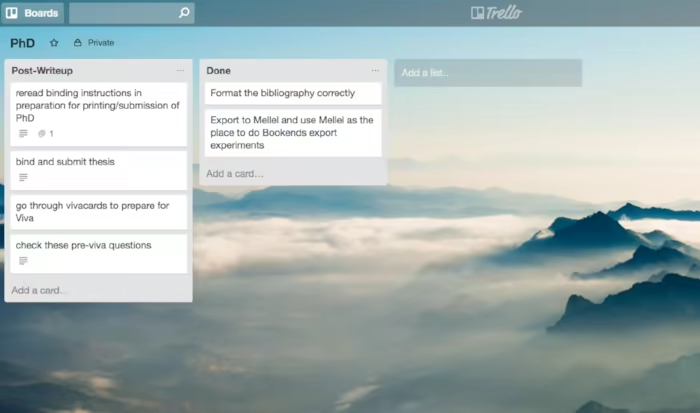
I used Trello for structuring my PhD argument and for tracking my progress during the drafting and redrafting of the final text.
Trello is primarily associated with the Kanban workflow / movement and as such it offers a fast and easy-on-the-eyes way to visualise structure, the passage of tasks through a particular workflow and so on.
It only works with an internet connection, however, which makes this a somewhat qualified recommendation. The mobile apps associated with Trello also lack an offline mode.
Tasks are split up into lists, and these are organised in a sequence. Thus for me, my lists at one point were my different chapters. It’s easy to email things (links, notes to yourself, or anything else text-based) into your lists from outside Trello, so it can function as a useful ‘bucket’ where you can deposit things you want to research in the future, or just tasks that need to be performed for a certain chapter.
It’s a way of seeing what needs to be done, or what you want to add to a particular chapter, at a single glance. Not essential, but I found it useful at certain junctions of the editing process.
Get new posts by email
Every new post, technical and personal, sent when I publish. Unsubscribe any time. Prefer a feed reader? There's technical RSS and personal RSS.