Splitting PDFs with Python
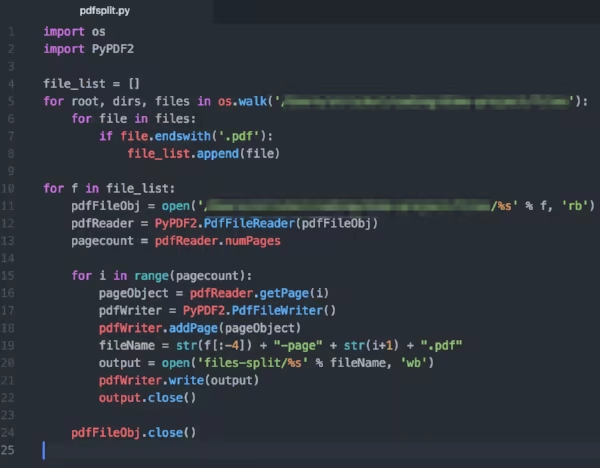
A big part of data science and data engineering is simply getting hold of the data you need from various file types and sources. For better or for worse, PDFs are a big part of the information ecosystem. They contain all sorts of charts, texts, images and other data points but are relatively complicated to parse.
As a first step in a larger project working with PDFs, I wanted to make sure I could split a series of multi-page PDFs into individual files that contained only one page. I ended up using Python for this since there are some useful libraries that already exist, saving me from reinventing the wheel.
I’ve found that a lot of the courses and tutorials teaching programming are big on examples that run neatly in a single file or in a web-browser interface. This is good for minimising complexity while you’re learning the syntax. But they miss an opportunity to connect that to everyday problems and interfaces where you’ll often be working. There’s a great gap (and opportunity) for teachers here. One book exists for Python, entitled ‘Automate All the Boring Stuff’. I wish such a thing existed for Go.
For my specific problem, it was non-trivial to get even the most basic prototype working. Before even thinking about the PDF part, I wanted to loop over all the files in a particular folder and print out the names. This seems like a simple thing to do, and in the end it was (sort of), but the documentation doesn’t really lend itself to newbies. This is what one of the functions I used looks like in the documentation, for example:
[caption id=“” align=“alignnone” width=“600”]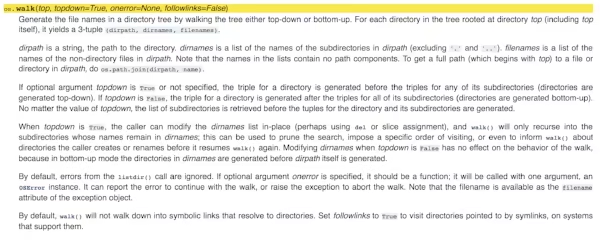 Not particularly intuitive… [/caption]
Luckily, this being a fairly ordinary and common task, various people had suggested ways to iterate over some files and list the filenames. StackOverflow proved helpful, as did some friendly voices over on the PythonistaCafe forum. For a simple file list, os.walk seemed to be the easiest option, though someone has since let me know that for Python 3.5 onwards there’s also glob which looks a lot less verbose to use.
Chapter 13 of Automate All the Boring Stuff is all about PDFs, so I started my initial version of a pdf-splitter with a great deal of assistance from Sweigart’s sample code. He recommends PyPDF2 as the best place to start. I looked over the documentation and it was all surprisingly comprehensible.
You start by reading the file with PdfFileReader(), then you can call a variety of objects from that file (its contents, the number of page numbers and so on). If you need, you can then use PdfFileWriter() to make a new PDF file. I initially worked with a single test file, then I combined it all into a loop. Then I added the file names loop (that I’d initially coded up) to provide a meta-loop structure.
Along the way I had to remind myself how to do formatted string printing using %. Absent Sweigart’s examples, I wouldn’t have remembered to use .close() on the PDF objects, so that was a useful reminder.
The code now works mostly as I’d like it. It’s still fairly slow. It’s a non-concurrent process, so it works through the files one at a time. Now that I know about Go, concurrency and parallelism, I’m very curious to know how it’d perform if I coded this all up using Go. (Yes, I know that asyncio exists but it seems too much effort to try to figure that out.)
Things I’d like to improve:
- I want to try
globto see if that speeds it up and/or makes my code more readable. - In some future universe I’d like to try the exact same exercise using Go. I’m not sure what packages are available for splitting / creating PDFs, either in the standard library or as external repositories. I may or may not take this on next week.
- I think the
root, dirsis unnecessary from the first loop, so I’ll try removing them. - It might be useful to set a
PATHattribute to ensure the folder structure is clearly defined. - I want to add comments and to document my code with docstrings.
- I want to add testing to the file, e.g. if there are no files in the folder I’ll get an error. I don’t really know what my options are for Python testing, but I’ll read the relevant parts of this to learn more.
- I’d like to benchmark the process to get a general sense of how long it takes, and also for possible comparison against my Go version.
- I think it might make sense to turn parts of this code into callable functions. I don’t have enough practical experience to know if that’s overkill or if it’s recommended.
- When I installed
PyPDF2I just used apip installbut I think it’s better practice to use a virtual environment to preserve the choices I’m making. This article seems like it’ll tell me more about my options for such wrappers / virtual environments in Python.
The next big step for this mini-project is to add in a regex search loop. I want to extract a particular string pattern from each page and use it to relabel all the filenames.